Nginx Ingress
LoadBalancer and Beyond
This document is based on a bare-metal Raspberry Pi Kubernetes (K8s) cluster, as discussed in the previous post. To facilitate external access, a load balancer like MetalLB is required. The setup of MetalLB was covered in the previous post.
For this guide, we will use the Ingress-Nginx Controller.
Introduction
So, what is an ingress? There are two kinds of network communication: Ingress and Egress.
- Ingress — Controls external access to services within the cluster, typically via HTTP/HTTPS. It acts as a gateway for handling incoming traffic and routing it to the appropriate backend services.
- Egress — Manages outbound traffic from the cluster to external services. It defines policies to regulate how pods can communicate with external networks.
Ingress is particularly useful for exposing services via a single endpoint while managing SSL termination, path-based routing, and load balancing. In contrast, egress rules help enforce security by restricting outbound connections. Manipulating ingress resource is similar to manipulating Nginx server with nginx.conf.
The basic architecture is as follows.
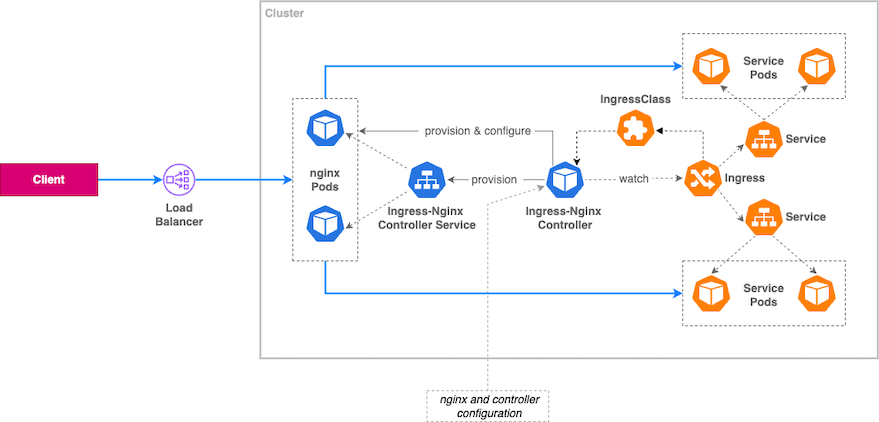
There is a detailed post about the Ingress-Nginx Controller from the AWS blog. Simply replace the load balancer in the Figure 1 with MetalLB service which is already exposed using the Ingress-Nginx Controller Service. This comes right out of the box.
Installation
Installing the NGINX Ingress Controller is straightforward. Refer to the official guide and apply the following configuration.
This setup includes two primary components:
- Deployment — responsible for running the ingress controller pods
- Service — exposing the ingress controller to the network
apiVersion: v1
kind: Service
metadata:
  labels:
    app.kubernetes.io/component: controller
    app.kubernetes.io/instance: ingress-nginx
    app.kubernetes.io/name: ingress-nginx
    app.kubernetes.io/part-of: ingress-nginx
    app.kubernetes.io/version: 1.12.0
  name: ingress-nginx-controller
  namespace: ingress-nginx
spec:
  ipFamilies:
  - IPv4
  ipFamilyPolicy: SingleStack
  ports:
  - appProtocol: http
    name: http
    port: 80
    protocol: TCP
    targetPort: http
  - appProtocol: https
    name: https
    port: 443
    protocol: TCP
    targetPort: https
  selector:
    app.kubernetes.io/component: controller
    app.kubernetes.io/instance: ingress-nginx
    app.kubernetes.io/name: ingress-nginx
1 type: NodePort- 1
-
The default network type is
NodePort. Change this toLoadBalancerwhen usingMetalLB.
Exposing the Ingress Controller
To expose the ingress controller, define a service of type NodePort or LoadBalancer.
$ kubectl edit svc ingress-nginx-controller -n ingress-nginxTo route traffic to services inside your cluster, create an Ingress resource. This routes https://shaneoh.org traffic to the https://www.shaneoh.org Kubernetes service on port 80.
For more details check the blog post on URI based versus Host based routing in Ingress.
redirect-root-to-www.yaml
apiVersion: networking.k8s.io/v1
kind: Ingress
metadata:
  name: redirect-root-to-www
  namespace: default
  annotations:
1    nginx.ingress.kubernetes.io/rewrite-target: /
    nginx.ingress.kubernetes.io/permanent-redirect: "http://www.shaneoh.org"
spec:
  ingressClassName: nginx
  rules:
  - host: "shaneoh.org"
    http:
      paths:
      - path: /
        pathType: Prefix
        backend:
          service:
            name: placeholder-service
            port:
number: 80- 1
- The routing path handled by the ingress service is omitted and then passed to the services.
After creating the resource, check if it is running correctly by:
$ kubectl get ingress

NAME                   CLASS   HOSTS         ADDRESS        PORTS   AGE
redirect-root-to-www   nginx   shaneoh.org   192.168.0.11   80      5d9h
Stay tuned for future posts covering advanced ingress configurations, including Let’s Encrypt TLS using cert-manager.